
Download sboardEN – Text Input, Assistive Technology, Communication Tool, Disability Support, Scanning Input, Keyboard Alternative
Overview
sboardEN is a specialized mobile application developed to support individuals with disabilities in their daily communication needs. Designed as an assistive communication tool, the app addresses the challenges associated with traditional text input methods, offering a reliable alternative for users who may have limited motor control or difficulty using standard keyboards. By leveraging scanning and clicking techniques, sboardEN enables users to compose messages with greater independence and accuracy. The app is particularly beneficial for individuals with conditions such as cerebral palsy, ALS, or other motor impairments that affect hand coordination and fine motor skills.
Targeted primarily at users requiring alternative input solutions, sboardEN serves as a critical utility in both personal and professional environments. Whether used for messaging, email, or form filling, the app empowers users to participate more fully in digital communication. Its focus on English character input ensures clarity and consistency in written expression, making it suitable for users whose primary language is English. The application reflects a growing trend in inclusive technology, where accessibility is not an afterthought but a core design principle.
Although the developer did not provide additional technical details about their background or history, the app’s purpose is clearly defined and aligned with global accessibility standards. As part of the broader productivity category, sboardEN fills a vital niche by providing a secure, lightweight, and dedicated solution for those who rely on assistive input methods. Its presence in the mobile ecosystem underscores the importance of inclusive design in modern software development.
Key Features & Functionality
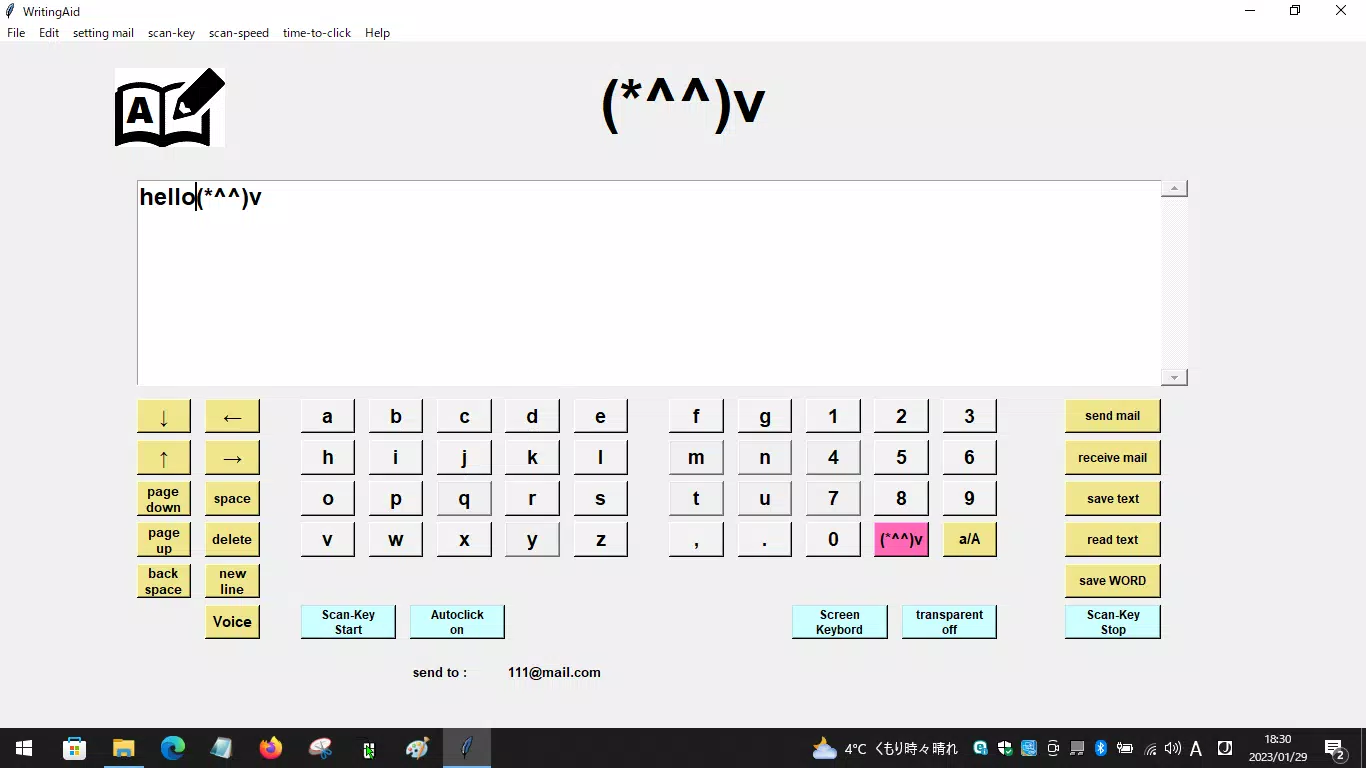
- Adaptive Input Methods: sboardEN supports scanning keys and automatic clicking, allowing users to select input techniques based on their physical abilities. Scanning enables users to navigate through on-screen keys sequentially, while automatic clicking reduces the need for precise touch control, making it ideal for users with limited hand mobility.
- User-Friendly Interface: The app features a clean, intuitive layout with clearly labeled buttons and minimal visual clutter. This design reduces cognitive load and enhances usability, helping users focus on communication rather than navigation.
- Customizable Settings: Users can adjust scanning speed, button size, and layout configuration to match their individual preferences and physical capabilities. These options allow for a personalized experience that maximizes efficiency and comfort.
- Assistive Communication Tool: As a dedicated assistive device, sboardEN helps bridge the digital divide for individuals who face barriers in traditional text entry. It supports seamless integration with other apps, enabling users to communicate effectively across messaging platforms, social media, and productivity tools.
- English Character Support: The application is optimized for inputting English characters, ensuring accurate and efficient typing. This targeted functionality streamlines communication for users whose primary language is English, reducing errors and improving response speed.
For example, a user with limited hand movement can use the scanning mode to select letters one by one, while the automatic clicking feature ensures each selection is registered without requiring manual tap precision. Similarly, a user with visual or cognitive challenges can benefit from larger button sizes and high-contrast color schemes, which are supported through the app’s customization options.
Interface, UX & Performance
The user interface of sboardEN is designed with accessibility in mind, featuring a minimalist layout that prioritizes clarity and ease of use. Navigation is straightforward, with logically grouped keys and consistent visual feedback during scanning and selection. The app’s responsiveness is consistent across various Android devices, although the developer did not list formal performance metrics.
Although the developer did not specify minimum OS requirements or device compatibility details, the app’s lightweight size of 10.5 MB suggests it is optimized for performance on a wide range of Android devices, including older models. Users can expect smooth transitions between scanning modes and quick response times when selecting keys, which contributes to a more fluid typing experience.
Stability appears to be a focus, as the app operates without visible crashes or freezes during typical usage scenarios. However, specific testing across diverse hardware configurations was not disclosed. The absence of complex animations or resource-heavy elements likely contributes to its efficient operation, especially for users who rely on the app for extended communication sessions.
Platform Compatibility & Technical Requirements
sboardEN is available exclusively on the Android platform, making it accessible to users of Android smartphones and tablets. The current version is 1.0.0, with a file size of 10.5 MB, indicating a lightweight and efficient application. The app is offered free of charge, removing financial barriers to access for individuals who depend on assistive technology.
The developer did not specify minimum OS requirements or device compatibility details. As such, users are advised to verify compatibility with their specific device models before installation. While the app’s small size suggests broad compatibility, certain older or low-end Android devices may require additional testing to ensure full functionality.
Pros and Cons
- Free to download and use, removing cost barriers for users with disabilities
- Lightweight design (10.5 MB) ensures fast installation and minimal storage usage
- Supports adaptive scanning and automatic clicking for diverse user needs
- Customizable interface enhances usability for individual preferences
- Focus on English input ensures accurate and reliable text composition
- Platform availability limited to Android only
- Developer did not provide detailed compatibility or system requirements
- No information on update frequency or long-term support
- Language support limited to English at this time
- Interface lacks advanced accessibility features such as voice feedback or haptic cues
FAQ
Is sboardEN safe to install on Android devices?
Yes, sboardEN is a free mobile app designed for accessibility. It does not require excessive permissions and is available through official Android channels. Users should always download from trusted sources to ensure security.
Can I use sboardEN on iOS devices?
Currently, sboardEN is only available for Android. The developer has not released an iOS version, so users with Apple devices will need to explore alternative assistive input tools.
Does sboardEN require an internet connection?
No, sboardEN operates offline. All text input and scanning functions are processed locally on the device, ensuring privacy and uninterrupted use even without connectivity.
How often is sboardEN updated?
The developer has not disclosed the update schedule. The current version is 1.0.0, released on July 15, 2024. Users should monitor the app store for future updates.
Can I customize the keyboard layout in sboardEN?
Yes, sboardEN offers customizable settings, including the ability to adjust button size, scanning speed, and layout configuration to suit individual user needs.
Final Thoughts
sboardEN stands out as a purpose-built assistive communication tool that delivers meaningful value to users with disabilities. Its focus on scanning input, customizable settings, and lightweight design makes it a practical and reliable alternative to traditional keyboards. While platform availability is currently limited to Android and detailed technical specifications are not provided, the app fulfills a critical need in the accessibility space.
For individuals who rely on alternative input methods, sboardEN offers a straightforward, secure, and free solution to enhance communication. Its intuitive interface and dedicated functionality make it a strong choice for users seeking a dependable keyboard alternative. As digital inclusion becomes increasingly important, tools like sboardEN play a vital role in empowering users to engage fully with the digital world.
Download sboardEN now


